Best Zebra Barcode Scanners UK 2026
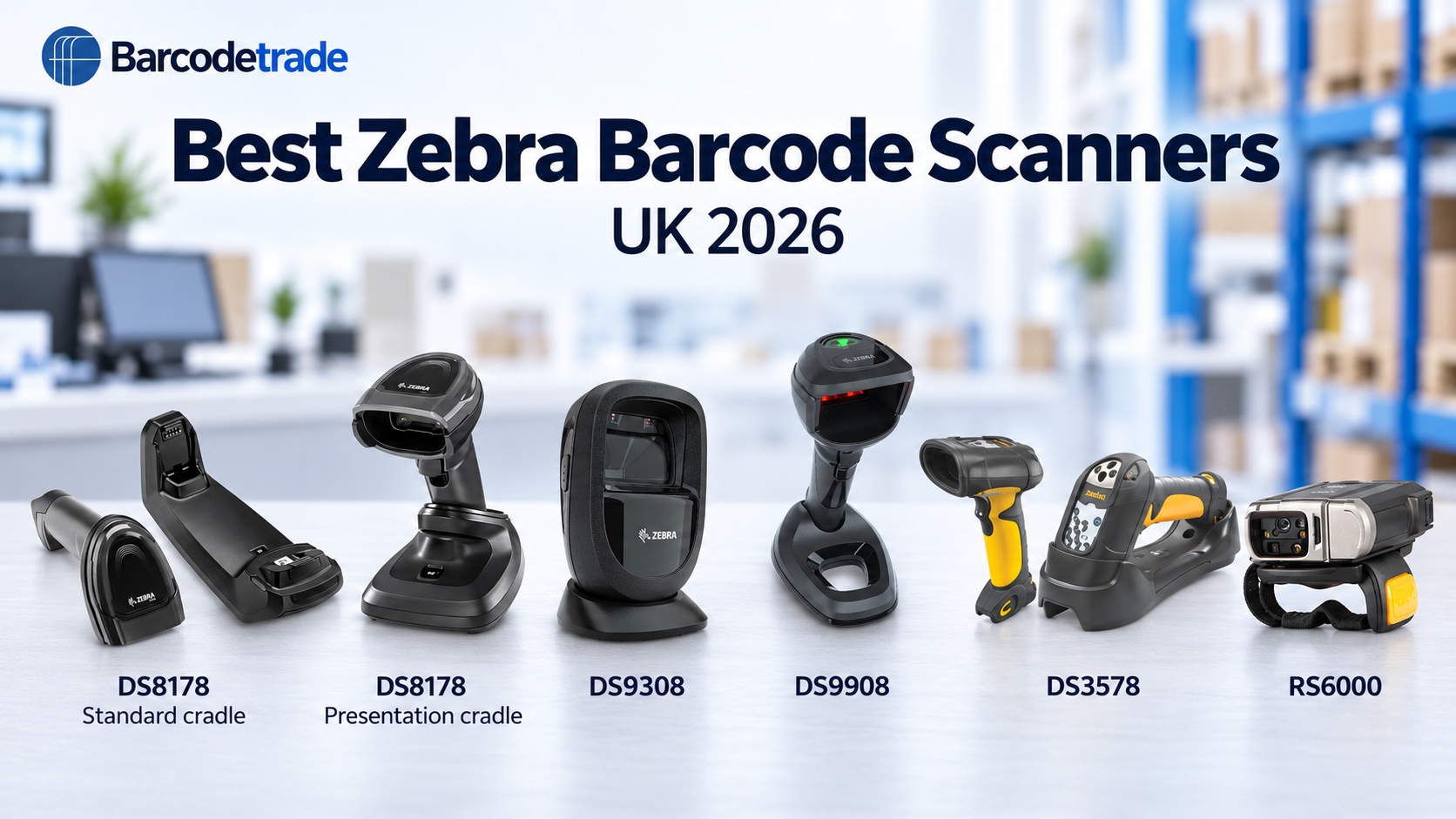
Best Zebra Barcode Scanners UK 2026: DS8178, DS9308, DS9908, DS3578 & RS6000
Choosing a Zebra barcode scanner comes down to one question: how will your team actually scan? A shop counter, a clinic, a warehouse aisle and a picking line each need a different style of scanner, and Zebra makes a model for all of them.
At Barcodetrade, we supply Zebra scanners new, unused, refurbished and used. This guide covers the five models our customers ask about most, who each one suits, and how to choose.
Quick guide: which Zebra scanner is right for you?
Scanner | Best for | Style |
|---|---|---|
Zebra DS8178 | Shops, clinics, stockrooms | Cordless Bluetooth |
Zebra DS9308 | Tills, reception, ticketing | Hands-free presentation |
Zebra DS9908 | Busy checkouts with bulky items | Hybrid, handheld or stand |
Zebra DS3578 | Warehouses and high racking | Rugged cordless, extended range |
Zebra RS6000 | Picking, packing, sorting | Wearable Bluetooth ring |
Zebra DS8178: the cordless 2D scanner
If you need cordless freedom and 2D scanning in one device, the DS8178 is the one to look at. It connects over Bluetooth and reads 1D and 2D barcodes, including QR codes, so staff can move around the shop floor, stockroom or clinic without a cable. It comes in kits with either a standard cradle or a presentation cradle:
Standard cradle kit: for example DS8178-SR0F107ZZWW with the CR8178-SC100F4WW cradle, battery and USB cable (CBA-U21-S07ZBR). The cradle keeps the scanner charged and connected.
Presentation cradle kit: the DS8178 scanner with the CR8178-PC100F4WW presentation cradle, battery and USB cable. The cradle holds the scanner upright for hands-free counter use, and you can lift it out for handheld scanning.
Zebra DS9308: the hands-free presentation scanner
The DS9308 sits on the counter and reads as soon as a barcode is presented, which keeps queues moving at tills, reception desks, ticket counters and click-and-collect points. It reads 1D and 2D codes, including codes on a phone screen.
Example model: DS9308-SR4U2100AZE, standard range area imager in Midnight Black
Typically supplied with: USB cable (CBA-U21-S07ZBR)
Zebra DS9908: the hybrid imager for busy checkouts
The DS9908 works two ways. Leave it in the stand for hands-free scanning, or take it out as a handheld for large, heavy or awkward items. It is corded, so there are no batteries to charge and nothing to pair.
Example model: DS9908-SR00004ZZWW hybrid imager with stand
Typically supplied with: Shielded USB cable (CBA-U21-S07ZBR)
Zebra DS3578: the rugged scanner for warehouses
Warehouse scanners need to survive rough handling and read labels that sit high on racking. The DS3578 is a rugged cordless imager with extended range, built for exactly that.
Example kit: DS3578-ER2F005WR extended range rugged cordless imager with the STB3578-C0007WR charging base
Typically supplied with: Battery and shielded USB cable (CBA-U21-S07ZBR)
Zebra RS6000: the wearable ring scanner
The RS6000 is worn on the finger, so both hands stay free for picking, packing, sorting and loading. It is a popular choice for logistics and warehouse teams that scan all day.
Example model: RS60B0-SRSDWR Bluetooth wearable imager
Typically supplied with: Battery and strap
Cordless, hands-free or hybrid: how to decide
Choose cordless (DS8178, DS3578, RS6000) if your team moves around while scanning. Zebra’s cordless models connect over Bluetooth and charge in a cradle or base.
Choose hands-free (DS9308) if scanning happens at a fixed point and speed matters, such as a till or ticket desk.
Choose hybrid (DS9908) if you need both, for example a checkout that also handles large items.
Choose rugged (DS3578) if scanners are dropped, knocked or used in a busy warehouse.
Choose wearable (RS6000) if staff need both hands free while they scan.
Why buy refurbished or used Zebra scanners?
Zebra scanners are built for demanding daily use, so a graded refurbished or used unit can give you years more service for less than the cost of buying new. You also keep working equipment in use for longer, which is better for your budget and for the environment. We grade every scanner clearly, from unused and new boxed to good used, so you know exactly what you are buying.
If you need scanners for a short-term project instead of buying, take a look at our rental options, or see more of the range on our Zebra scanners page.
Frequently asked questions
Do these Zebra scanners read QR codes?
Yes. All the models above are imagers, which read 1D and 2D barcodes including QR codes.
Which Zebra scanner is best for a shop counter?
The DS9308 is ideal for a fixed till point, and the DS9908 suits counters that also handle bulky items.
Which Zebra scanner is best for a warehouse?
The DS3578 is the rugged choice for racking and tough conditions, and the RS6000 ring scanner is ideal for picking and packing.
Do the scanners come with cables and cradles?
Yes. Our kits include the accessories they are designed to work with, such as cables, cradles or bases, batteries and straps where applicable.
Can I buy several scanners at once?
Yes. Tell us the models and how many you need and we’ll quote for your full requirement.
How much do they cost?
Pricing depends on the model, condition and quantity, so please get in touch for a quote.
Get a quote
Call 01252 511409 or send us your enquiry with the models and quantities you need, and we’ll come back to you with pricing and current availability.
Barcodetrade (Fala Ltd), Blue Box Building, 14 Eelmoor Road, Farnborough, Hampshire.